
Parent workspace · 4 min read
Record school updates and medical follow-up
Use an optional template to keep your observation, information source, and follow-up together.
Updated · Website and iOS workspace
Before you start
Check the case and have the relevant school message, appointment summary, or other source available. Record information you know; leave unknown details blank. These templates organize records and do not make medical or legal decisions.
Follow these steps
Choose an optional template
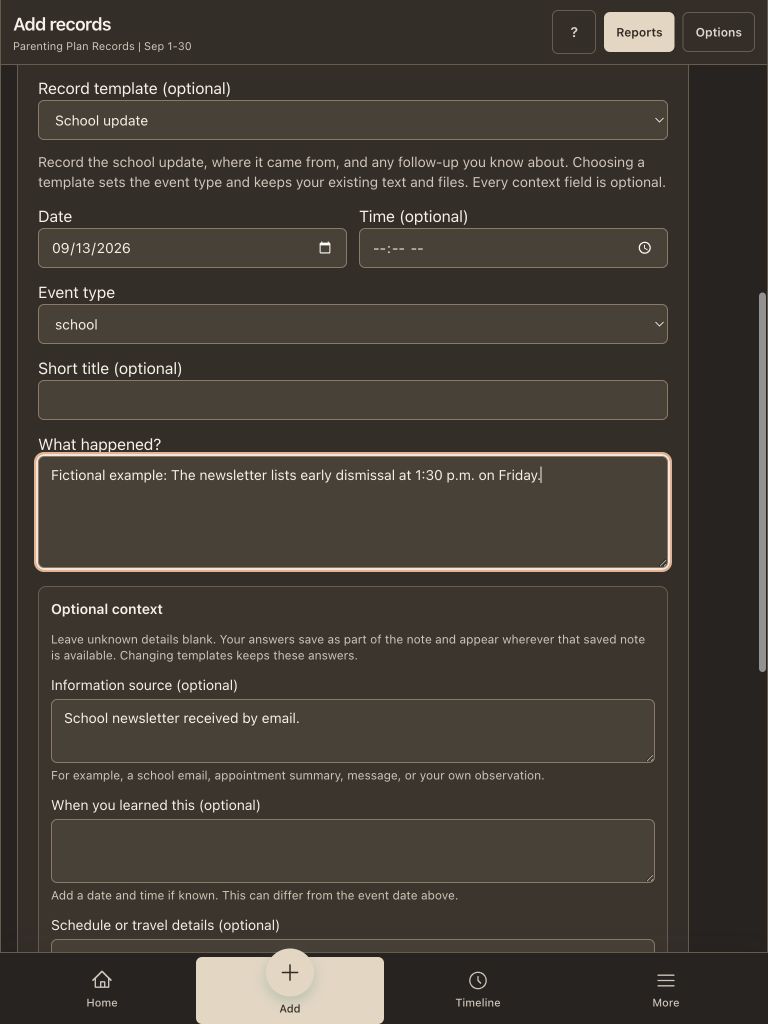
Open Add records → Event. Under Record template, choose School update or Medical follow-up. Choosing a template sets the Event type and keeps your existing text and files. You can change the type yourself afterward.
Set the event date and describe what happened
Use the date of the event or update you are recording. Add a time only if known. Write the observation under What happened? Separate something you saw from something reported by another person. Avoid filling in a reason you do not know.
Add the source and when you learned about it
Optional context includes Information source and When you learned this. For example, identify a school email received the following morning. That receipt date can differ from the event date. A source description does not attach the document: use Attach files or Take a photo for a supporting copy.
Separate plans, questions, and outcomes
Use Schedule or travel details for the relevant appointment or deadline. In Agreed next step or open question, say whether something was agreed, requested, or remains a question. Use Outcome or follow-up only for information you know. Blank prompts add no text to the saved note.
Save and check the complete note
The observation and filled context fields save together as ordinary note text, within a combined 5,000-character limit. Choose Save event and wait for Event saved, then find it in Notes & events or Timeline. To continue later, Save private draft retains the template and text. Draft attachments remain on the open page until the event is saved.
Use the same approach for travel
Travel / handoff offers the same optional prompts. Identify the itinerary or agreement, put a time zone beside each travel time, and distinguish a planned handoff from the actual handoff. An event note does not change your calendar or exchange log. Record transportation costs separately in Expenses when needed.
Check that it worked
The saved note contains your observation and only the context you entered. Its category, dates, supporting files and report scope match your intent. A private draft remains private preparation until you save an event.
An example to follow
Fictional example: Event date September 12. What happened? The school email lists a missed assignment. Information source: Teacher email dated September 13, attached. When you learned this: September 13 at 9:00 AM. Agreed next step or open question: I asked which assignment needs to be completed; no response yet. Leave Outcome blank until a response arrives.
If you get stuck
I chose another template. Did it erase my work?
No. Existing text, context answers, dates and attachments stay in the form. Choosing a template changes Event type; review it before saving. Selecting No template still keeps and displays context that already has answers.
I do not know why an appointment or school day was missed.
Record the source and what you actually know. Leave an unknown detail blank or describe it as unknown. A late update or missing portal entry alone does not establish why something happened.
How do I add a later outcome?
Open the saved note and use its edit control to update the note text, making the later date clear. Save a separate dated event if that better describes the new occurrence. Reopen the record to check the result; sent attorney copies retain their earlier contents.
Watch the walkthrough
Videos include captions and written transcripts.
Related guides
Still need help? Contact support with the screen name and error wording. Leave out private case details. These instructions explain the product and do not provide legal advice.